# Alt.town

## **Alt.town is a Vitual Celebrity Value Growth Platform.**

Alt.town is a service that allows users to trade the value of virtual creators expressed in digital assets. The value of creators is based on their content and fandom.

Virtual celebrities such as VTubers, virtual influencers, and virtual idols who join Alt.town will issue a digital asset called DNA, symbolizing their value. Users, including fans and Web3 supporters, can buy the DNA of their favorite virtual celebrities, anticipating an increase in value and enjoying the content provided by the celebrities. The price of these digital assets is determined by user-to-user transactions, supported by on-chain based order-book trading.

***

## **Virtual Trend + Web3 Tech**

The entertainment industry has entered the era of virtual influencers. The emergence and growth of VTubers in the creator market is an irresistible trend. We have implemented blockchain technology to utilize more actively and expand more diversely VTubers' IP and content.

## **The Future of Trading IP**

The content industry has made significant progress based on Web 2.0 platforms, but these platforms have monopolized the fruits of success. We support creators in continuously producing high-quality content and consider ways to share that value with the public.

## **A New Relationship Between Celebs and Fandom**

We focus on forming new relationships between celebrities and fans. Moving away from the previous one-way communication, fans can participate in decision-making regarding celebrity activities based on the digital assets they have bought in, or they can create secondary works using the celebrity’s IP

Experience the new Web3 culture with global virtual celebrities.


# Alt

## **Alt, a virtual celebrity with Alt.town**

A virtual celebrity partnered with Alt.town is called Alt. ‘Alt’ refers to an alter ego. Through the partnership with Alt.town, Alt will provide IP usage rights and own a portion of their tokenized value, which they can monetize or share with their supporters.

Alt serves as the core of the Alt.town ecosystem. We willl be announcing more Alts to join us in the future.


# DNA

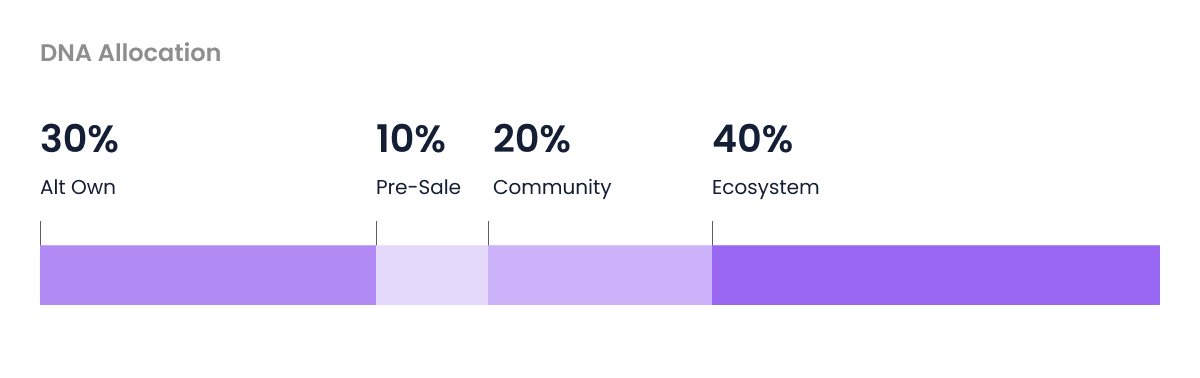
DNA (Dynamic Nurture of Affection) is a fungible token that symbolizes an Alt's value and is the most important element of Alt.town as it serves as both a value and trading. Each Alt issues one million DNA with all transactions recorded on-chain. DNA is stored in a spending wallet within Alt.town and cannot be transferred between users or moved outside of Alt.town. DNA is categorized into Owned by Alt, Ecosystem, Community, and Pre-Sale, accounting for 30%, 40%, 20%, and 10% of the total supply, respectively.

100,000 of those DNA will be distributed through three rounds of pre-sales. Once the pre-sale ends, on-chain-based order-book trading begins, allowing users to freely buy and sell DNA among themselves. After the pre-sale ends, 90% of the sales revenue will be allocated to the Alt through a post-sale settlement. For detailed information about the pre-sale and order-book trading, please visit the Town page.

When the contract between Alt and Alt.town terminates, DNA trading will cease, and any held DNA will be extinguished. Operation policies including the cessation of DNA trading adhere to the terms of service within the Alt.town platform.

{% content-ref url="/pages/TE65rm8qM22ueQ0oNqwB" %}
[DNA Structure](/alt.town-service/dna/dna-structure)
{% endcontent-ref %}


# DNA Structure

Each Alt in Alt.town issues one million DNA, representing their value. These DNA can be bought and sold through pre-sale and order-book trading. Each Alt issues its own DNA, and the volume allocation and lock-up release period for DNA apply equally to all Alts.

The DNA allocation is organized as follows:

<figure><img src="/files/C03OUFBOKCqX2gPz07px" alt=""><figcaption></figcaption></figure>

## **1. Alt Own**

Alts hold 30% of its total DNA supply, which amounts to 300,000. This amount is initially locked up but will be gradually unlocked at a rate of 1% per month over a total of 30 months from the start date of trading. Alts can distribute their DNA to fans through airdrops or sell it in Town.

## **2. Pre-Sale**

During the pre-sale period, 100,000 DNA, which is 10% of the total DNA supply, will be circulated. The pre-sale is divided into three rounds and will last for a total of seven days. During this period, users can only buy DNA and cannot sell it. 90% of the total pre-sale revenue will be allocated to the respective Alt.

After the pre-sale ends, on-chain-based order-book trading will begin.

Any remaining unsold amount during the pre-sale will be will be locked up for one year and then gradually unlocked at a rate of 2.5% per month (1.25% each for Alt and the service). The supply allocated to the service will be utilized as event supply for their respective Alt.

## **3. Ecosystem**

40% of the total DNA supply is reserved as an asset for the ecosystem, which can be utilized through governance consensus. Starting one year after the launch of the Alt.town service, voting will be conducted among holders of Alt's DNA and governance token, $TOWN. Based on the consensus result, the timing and quantity of ecosystem DNA usage will be determined. Until the voting feature is added, the ecosystem supply will remain locked up. However, 1% (10,000) is used to provide initial liquidity without lock-up.

## **4. Community**

DNA for the community, amounting to 200,000, which is 20% of the total supply, is utilized for various purposes such as events and airdrops in consultation with the respective Alt. This includes the random DNA provided for the sign-up event. Except for the initial 2% allocated for community use, the remaining 18% will be unlocked at a rate of 1% every six months.

## **5. Event**

The event supply consists of unsold DNA from the pre-sale period and is used for events related to the respective Alt. However, depending on the outcome of the pre-sale, this amount may not exist.


# Town(Trading)

In Town, you can trade the DNA of Alts who have joined in Alt.town. There are two methods for trading: pre-sale and on-chain-based order-book trading. During the pre-sale period, a fixed-price sale method is applied, allowing users to buy DNA at a fixed-price. After the pre-sale ends, trading will be switch to on-chain order-book trading, where buy and sell orders can be freely executed.

Once a trade is executed, the corresponding amount of DNA is transferred from the seller's wallet to the buyer's wallet, and all transaction details are transparently visible on-chain.

70% of the total revenue from the pre-sale will be allocated to the respective Alt, which is an important factor in supporting their activity and monetization. Additionally, 10% of the total transaction fees from DNA trades after the pre-sale will be allocated to the virtual celebrity, continuously encouraging and supporting the virtual celebrity’s engagement.

{% content-ref url="/pages/vmXYxEWnRfaP3iHixsJY" %}
[Pre-sale](/alt.town-service/town-trading/presale)
{% endcontent-ref %}

{% content-ref url="/pages/mECaQc0e0m27wdT6R8DB" %}
[On-chain Based Trading](/alt.town-service/town-trading/orderbook)
{% endcontent-ref %}


# Pre-sale

Alts in Alt.town sell 10% of their DNA supply during the pre-sale period. 70% of the total sales revenue from the pre-sale will be allocated to the respective Alts. The pre-sale is a *fixed-price sale*, meaning only buying is available during this period, and selling is not allowed.

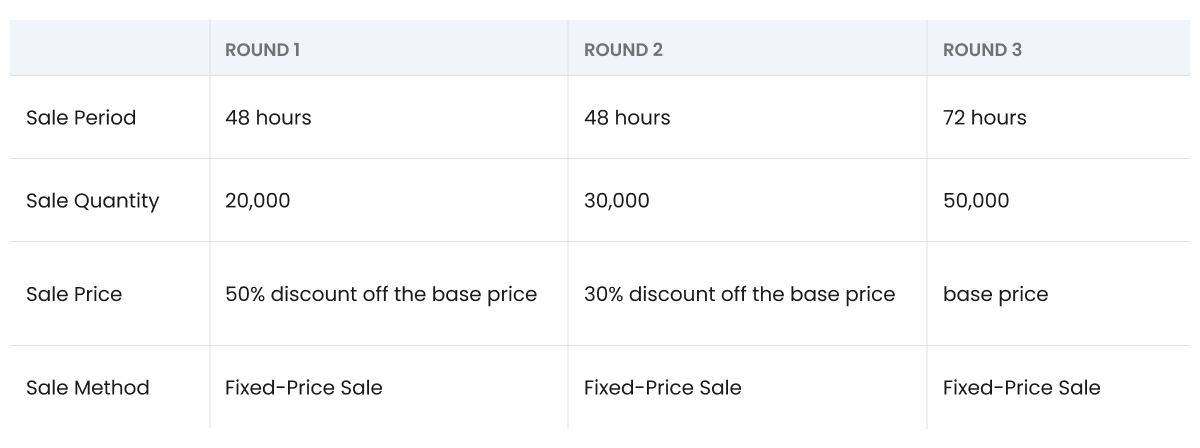
The sale period is 7 days from the date of move-in, with a total of 3 rounds: the first round lasts for 48 hours, the second round lasts for 48 hours, and the third round lasts for 72 hours. The sale price is based on a base price set by Alt, with the first round offering a 50% discount off the base price, the second round offering a 30% discount, and the third round selling at the base price.

If the quantity for a round is sold out after the round opens, purchasing will not be available until the next round begins. If there are unsold quantities during a round, they will not be carried over to the next round. Instead, after the pre-sale ends, those unsold quantities from each round will be combined and moved to the ecosystem wallet. Unsold quantities moved to the ecosystem wallet will be locked up for one year, after which they will be allocated at a rate of 2.5% per month (1.25% each for Alt and the service). The amount allocated to the service will be utilized as event supply for the respective Alt.

{% hint style="info" %}

* Fixed-Price Sale: Available for purchase at a fixed-price without price fluctuations during the specified period.
* The base price will be set by the Alt, between 10 to 500 KEY per DNA.
  {% endhint %}

The sale duration, sale quantity, and sale price for each round are as follows:

<figure><img src="/files/qKkoDMYxpAYny3k4La57" alt=""><figcaption></figcaption></figure>


# On-chain Based Trading

Once the pre-sale period ends, you can continue trading on the order-book. Order-book trading is executed through the matching of buy and sell orders, allowing users to sell the DNA they have purchased or buy new quantities.

The order methods provided by Alt.town are as follows:

## **Limit Order**

* A limit order is a type of order submitted by a user who manually enters the price and quantity of DNA they wish to buy or sell.
* This order type is used when price is a priority, ensuring that the order will not be executed at a price higher than the specified buy price or lower than the specified sell price.
* If a sell order is place at a price lower than the current market price or a buy order is placed at a price higher than the current market price, it will be executed at the market price.
* Even if the specified price is reached, limit orders may not be executed due to the order method execution mechanism (price > time priority).

{% hint style="danger" %}
Depending on trade execution conditions, the pending order may not be fully executed.
{% endhint %}

## **Market Order**

* A market order is an order submitted without specifying a price.
* This order method is used when you want to execute a trade quickly. By setting only the order amount for a buy order or the order quantity for a sell order, the trade will be executed immediately at the market price.
  * Buy Order: If users set only the order amount, it will be immediately executed at the lowest price among the current ask prices.
  * Sell Order: If users set only the order quantity, it will be immediately executed at the highest price among the current bid prices.
* When a market order is placed, it will be executed sequentially, starting from the most favorable price (best bid/ask).

{% hint style="danger" %}
Orders may be rejected for the protection of users’ assets. Please refer to the order rejection criteria if your market order is rejected.
{% endhint %}


# Wallet

After creating an account with your email address, you can browse the service freely.\
If you're interested in participating, you’ll likely want to start making transactions. To do so, you'll need to connect a crypto wallet.

## Why do I need to connect a wallet before buying and selling?

Assets used on Alt.town are stored in users' personal wallets. When you buy or sell DNA using KEY, the assets are transferred between wallets through smart contracts. This means only the wallet owner can control the assets, and Alt.town does not store or manage user funds. A connected wallet is essential for converting in-app activity into actual blockchain transactions.

## What wallets can I use?

You can either create a new wallet within Alt.town or connect an existing crypto wallet. Simply choose your preferred wallet provider from the available options.&#x20;

***

*🌟 Please note: the wallet must support the BNB Smart Chain (BSC).*


# Tokenomics

There are 4 types of currency utilized in Alt.town: DNA, KEY, $TOWN, and Mile.

Users can convert Mile earned from event participation to KEY at any time, and KEY in the spending account can be converted to $TOWN. $TOWN can be transferred externally through the wallet or exchanged back to KEY. However, Mile, KEY, and DNA cannot be transferred between users. NFTs may be added in future updates. Let's take a closer look at the currencies stored in the spending account and the wallet, respectively.

<figure><img src="/files/tS0lzrR8m5SYUzSjAmXn" alt=""><figcaption></figcaption></figure>

<figure><img src="/files/afYlLp5SPfJwXULTcPA8" alt=""><figcaption></figcaption></figure>


# KEY

{% hint style="info" %}

* Contract Address : [0x8a13e4dbfa3127420cc12fa923ab5458d68baee0](https://opbnbscan.com/token/0x8a13e4dbfa3127420cc12fa923ab5458d68baee0)
* Chain : opBNB
* Maximum Supply : No Limitation
  {% endhint %}

KEY is a utility token used as a payment method within the service. The value of KEY is fixed at 100 KEY = 0.75 USDT, and its issuance is linked to $TOWN without any limit. KEY can be obtained through conversion from Mile, exchange for $TOWN, and DNA sales. It is used to exchange for $TOWN, buy DNA, and pay transaction and exchange fees. However, it cannot be converted back to Mile. The price of all DNA is also denominated in KEY, which serves as the price unit for all DNA.


# Mile

Mile is the only off-chain currency in Alt.town. It is a free point awarded through event participation and can be converted to KEY. However, it cannot be used to purchase DNA or exchanged for $TOWN. Conversion can only be done in increments of 10,000 Mile, with a minimum conversion amount of 10,000 Mile or more. The maximum amount of Mile that can be converted per day is 50,000 Mile. The value of Mile is fixed at 0.75 USDT per 1,000 Mile, and the circulating supply is regulated through exchanges with KEY. Additionally, Mile will automatically expire one year after the date of accrual.


# $TOWN

{% hint style="info" %}

* Contract Address : 0x1aaeb7d6436FDA7cDac7b87ab8022e97586d2Da1
* Chain : BSC
* Maximum Supply : 2,000,000,000 TOWN&#x20;
  {% endhint %}

$TOWN is Alt.town's governance token and can be transferred to external exchanges and wallets. $TOWN is used for a variety of activities, including KEY exchange for Alt.town DNA transactions, external transfer fees, NFT production, governance participation, and staking.

$TOWN has a total supply of 2 billion tokens and the allocation is as follows: 15.5% for investors, 24.5% for the community, 18.5% for the treasury, 17.5% for the ecosystem, 17% for the liquidity, 5% for teams and 2% for advisors. $TOWN distribution and vesting periods begin at the time of its initial listing, following the Token Generation Event (TGE). Following the TGE, TOWN will be distributed at regular intervals such as monthly, or quarterly, with periodic unlocking and vesting.&#x20;

For detailed information on token distribution, lock-up, and vesting schedules, please refer to the separate Token Release Plan.

<figure><img src="/files/LyifaALc6zqa4EZwX7TG" alt=""><figcaption></figcaption></figure>

{% hint style="info" %}
The price of TOWN is calculated based on the price of CoinMarketCap.
{% endhint %}

{% embed url="<https://www.alt.town/town>" %}


# Utility

## 1. **Exchange KEY for DNA Transactions**

Exchange TOWN for KEY to use in the Alt.town service. There is no fee when exchanging TOWN for KEY, but a small gas fee is charged when exchanging KEY for TOWN.

(For example, if the market price of TOWN is $0.075, 1 TOWN can be exanged for 10 KEY.)

## 2. **Use Service Features and Participate in Events**

TOWN is used across various internal services offered by Alt.town, such as virtual celebrity development features and events. While typically exchanged for KEY within the platform, TOWN can also be used for service fees and asset purchases. Additionally, TOWN may grant access to airdrops or special event participation.

## 3. Staking

Staking TOWN grants veTOWN at a 1:1 ratio. Holding veTOWN allows users to receive staking rewards in TOWN. Detailed rules and reward structures for staking will be announced separately on the official website and announcements.

Staking is unavailable in the initial phase of the Alt.town service and may be introduced later depending on service stability and developments in the token economy. The minimum staking amount and eligibility requirements will be announced upon launch.

Staking deposits and withdrawals can be made at any time; however, withdrawals require a 7-day unlock period. In addition to flexible staking, fixed-term staking programs (e.g., 3, 6, or 12 months) will be introduced and offer additional rewards based on the duration of the commitment.

## 4. Participate in Governance

Holding a certain amount of veTOWN grants eligibility to participate in Alt.town governance. Governance participants can participate in key decision-making processes related to the platform. Eligibility requires holding a minimum amount of TOWN.\
For more details on Alt.town’s governance structure, please refer to Section 5: Governance.\ <br>


# Lock & Vesting

### **Vesting Schedule**

<figure><img src="/files/QHMeWmewUTEi5Kn8fQfi" alt=""><figcaption></figcaption></figure>

### **Detailed Categories**

<table><thead><tr><th width="140">Allocation Buckets</th><th>% of Total Supply</th><th>Amount of TOWN</th><th>Vesting Schedule</th><th>Description</th></tr></thead><tbody><tr><td>Investor</td><td>15.5%</td><td>310,000,000</td><td>1 yr cliff – 2 yr vest</td><td>Strategic investors who supported the project from its early stages, providing capital and guidance as seed participants and long-term stakeholders.</td></tr><tr><td>Treasury</td><td>18.5%</td><td>370,000,000</td><td>5 yr vest</td><td>Treasury serving as the backbone for sustainable growth — reserved for governance-directed initiatives, ecosystem resilience, and long-term operational funding.</td></tr><tr><td>Ecosystem</td><td>17.5%</td><td>350,000,000</td><td>5 yr vest</td><td>Ecosystem expansion and partnership incentives.</td></tr><tr><td>Community</td><td>20.0%</td><td>400,000,000</td><td>1 yr cliff – 4.5 yr vest</td><td>Community programs, events, and user incentives.</td></tr><tr><td>Airdrop</td><td>4.5%</td><td>90,000,000</td><td>~4 yr vest</td><td>Community rewards and user acquisition campaigns.</td></tr><tr><td>Exchanges &#x26; Liquidity</td><td>17.0%</td><td>340,000,004</td><td>100% liquid at TGE</td><td>Strategic allocations dedicated to exchange partnerships, ensuring market stability, deep liquidity, and strong global accessibility for $TOWN.</td></tr><tr><td>Team</td><td>5.0%</td><td>99,999,996</td><td>1 yr cliff – 4 yr vest</td><td>Core team allocation.</td></tr><tr><td>Advisor</td><td>2.0%</td><td>40,000,000</td><td>1 yr cliff – 4 yr vest</td><td>Advisors with expertise in biotech, IP, and tokenization supporting the protocol.</td></tr><tr><td><strong>Total</strong></td><td><strong>100%</strong></td><td><strong>2,000,000,000</strong></td><td></td><td></td></tr></tbody></table>


# Roadmap

<div align="left"><figure><img src="/files/9oeU1YyZ6QUoCK4hofql" alt="" width="375"><figcaption></figcaption></figure></div>


# Partners

<figure><img src="/files/bUMg3OHtAA2lTkoxU2dR" alt=""><figcaption></figcaption></figure>


# PWA Installation

You can access Alt.town in two ways: through web browser access or by installing the PWA (Progressive Web App). Since we’re optimized for mobile, we recommend adding us to your home screen for a seamless experience if that’s what you prefer.

\*PWA : Instead of installing a separate app from the app store, you can access it through a web browser and download it to your smartphone like an app.

## **Install on Android (Chrome)**

<div><figure><img src="/files/bxnWRxDV84L6VWSWbyKK" alt=""><figcaption></figcaption></figure> <figure><img src="/files/QjyYm8KbFd1B8OVVivT6" alt=""><figcaption></figcaption></figure></div>

1. Access [**app.alt.town**](https://app.alt.town/) using your **Chrome** browser.
2. Tap the **menu (⋮)** at the top-right corner.
3. Select **‘Add to Home screen’**.
4. Tap **‘Add’** again to confirm.

## **Install on iOS (Chrome or Safari)**

<figure><img src="/files/WQvpXelxmAmw5nv0hzOV" alt=""><figcaption></figcaption></figure>

1. Access [**app.alt.town**](https://app.alt.town/) using your **Safari** or **Chrome** browser.
2. Tap the **Share** button (the square with the arrow pointing up) at the bottom center.
3. Select **‘Add to Home Screen’**.
4. Tap **‘Add’** in the top-right corner.

## **Install on Desktop (Chrome or Safari)**

<figure><img src="/files/k5fY57CXIGXHaE1h1tEY" alt=""><figcaption></figcaption></figure>

1. Access [**app.alt.town**](https://app.alt.town/) using a supported browser like **Chrome** or **Safari**.
2. In **Chrome**, look for the **install icon** on the right side of the address bar and click it.
3. In **Safari**, click the **Share button** in the top-right corner of the browser window, then select **‘Add to Dock’**.
4. Follow the prompts to complete the installation.

📌 *Alt.town will be added to your desktop or Dock and launch in its own window like a standalone app.*

***

*🌟 We recommend using the Chrome or Safari browser. If you experienced installation issues while using a browser we don't support, please reinstall the PWA using Chrome or Safari.*


# Sign-up

## 1. **Enter your email**

Enter the email address you would like to sign up with. You can log in by entering your email address on the login page.

<figure><img src="/files/C5G7DX1MVEnwRLFLBxDI" alt=""><figcaption></figcaption></figure>

*🌟 To use Alt.town services, you must agree to the **Privacy Policy** and **Terms of Use/Service.** By creating an account, you are considered to have agreed to all of them. If you do not wish to agree, you will be unable to access the services.*

## 2. **Email Verification**

Verify your email address using the code sent to the email you entered.

<figure><img src="/files/TLZZUDhEMfTBBqnTj85c" alt=""><figcaption></figcaption></figure>

## 3. **Set a password**

Set a password that meets the requirements. Your password will be used for activities such as login, currency exchange, etc. Please be careful not to disclose your password.

<figure><img src="/files/VBMJ7MLk924j1mzHqJrp" alt=""><figcaption></figcaption></figure>

*🌟 You can reset your password in MY - Settings - Account - Account Settings.*

## 4. **Set your username**

Your username represents you in Alt.town. It can be any combination of letters, numbers, and symbols (-\_) from 4 to 20 characters.

<figure><img src="/files/FJ42O5XRTdy1G80lJdo2" alt=""><figcaption></figcaption></figure>

*🌟 You can change your username up to 2 times in 14 days. You can reset your username in MY - Settings - Account - Profile. Usernames that impersonate administrators or contain offensive language are not allowed. Please set an appropriate username in accordance with these guidelines.*

## 5. **Enter your referral code**

This is the referral code entry screen connected to the friend invitation event for Mile charging. Simply enter the referral code shared by your friend. After signing-up, when the invited user purchases 10 or more DNA of any Alt, both the inviting user and the invited user will receive 500 Mile each.

<figure><img src="/files/7vvGrhz8YemRMEiBW17S" alt=""><figcaption></figcaption></figure>

*🌟 Referral code entry can be skipped. The referral code entry screen is displayed only once during the initial sign-up, and it cannot be changed or entered afterward.*

## 6. **Sign-up Complete**

All sign-up steps are complete, congratulations!&#x20;

<figure><img src="/files/F6si20b5h1LAtegAzZex" alt=""><figcaption></figcaption></figure>


# Connect Wallet

Connect your wallet and receive a random DNA as a gift.&#x20;

## 1. **Intro**

Tap “Wallet Registration” in the Rewards tab, or “Connect Wallet” in the DNA or My tabs to open the wallet connection screen.

<figure><img src="/files/QgqN9asHdtf2r0qUfsgo" alt=""><figcaption></figcaption></figure>

## 2. **Select**

On the wallet connection screen, tap “Get Started” at the bottom and choose the wallet you want to connect.

<figure><img src="/files/PBc3A9gJdPxfDMYvDsa7" alt=""><figcaption></figcaption></figure>

## 3. **Connect**

Select a wallet and follow the on-screen instructions to complete the connection. Then confirm the signature request.

<figure><img src="/files/HHDVqUqo1rXs4YlSn8WC" alt=""><figcaption></figcaption></figure>

## 4. **Complete**

You can now start trading the value of your virtual celebrity on Alt.town.

<figure><img src="/files/tWEliZcfT4WMhGZoLQKT" alt=""><figcaption></figcaption></figure>

*🌟 Please note that the connected wallet address is permanently linked to your account and cannot be changed. To use a different wallet, a new account must be created.*


# Sign-in

Once registered, you can log in with your email and password, regardless of wallet connection.\
If your account is linked to a wallet, you can also log in directly using the third-party wallet you originally connected.

<figure><img src="/files/uCAQSUYvuZBtrF977ruo" alt=""><figcaption></figcaption></figure>

<figure><img src="/files/pwtygaHCzWg1S8JFqNGP" alt=""><figcaption></figcaption></figure>

*🌟 Your wallet address is a public, unique identifier — essentially your Alt.town account name. To create a new account on Alt.town, log in with a different email and connect a new crypto wallet*.


# App Structure

## **Home**

On the Home page, you can check out the virtual celebrities who have joined Alt.town and the DNA currently on sale. You can also view popular trend videos selected by the Alt.town editor.

## **Town**

In the Town section, you can view real-time charts of Alts sorted by trading volume, price, rapid rise, rapid fall, and wish. Click on an Alt to see more information. You can make decisions to buy or sell based on the Alt's basic information and the price trends of DNA that reflect its value.

## **DNA**

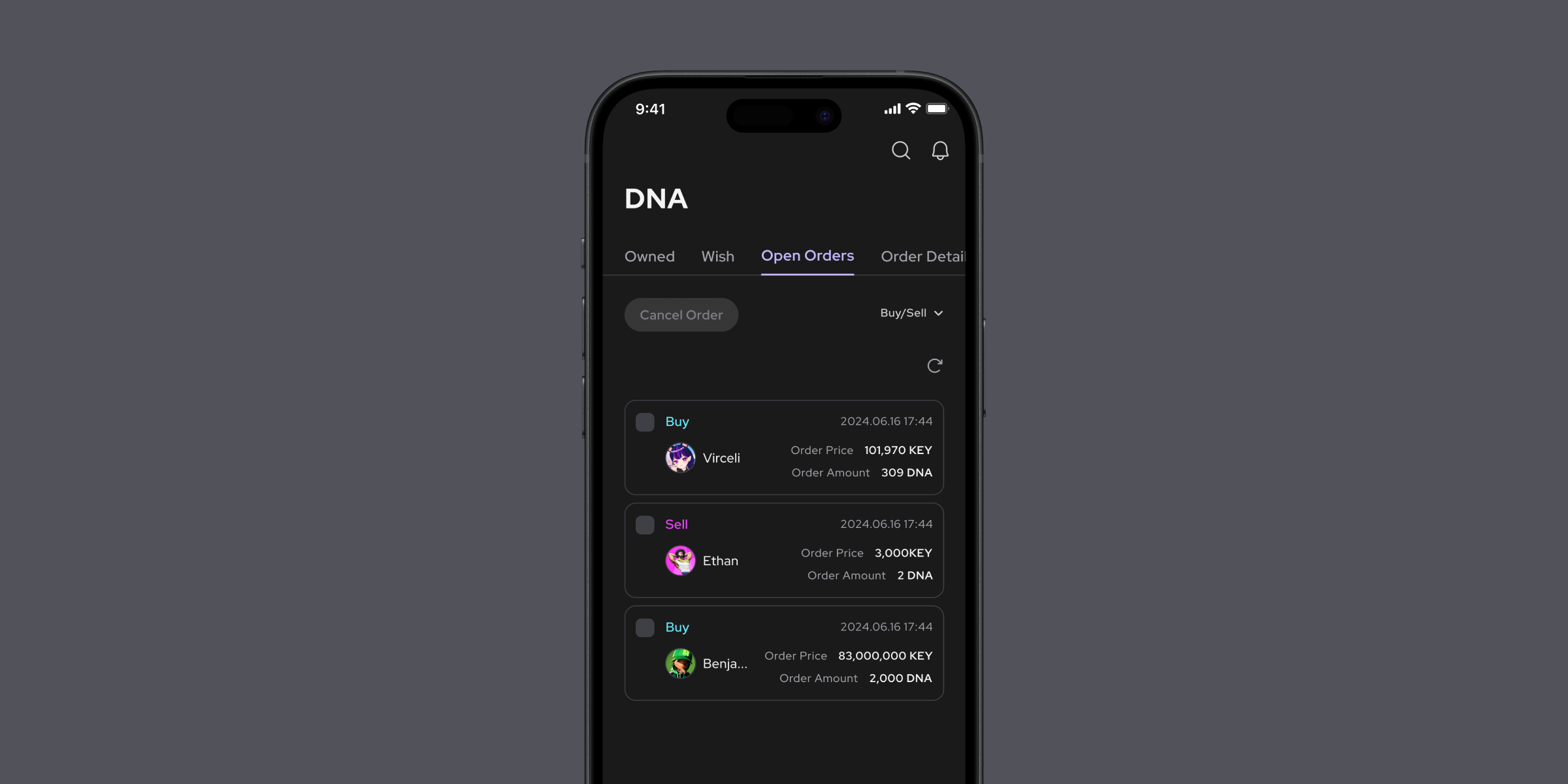
In the DNA section, you can view all your DNA holdings, pending DNA orders, and DNA you're interested in, all in one place.

## **Reward**

You can find ongoing events in the Reward section. By participating in these events, you can receive special benefits. New events will be continuously updated.

## **MY**

In the MY section, you can check your username and registered email address. Here, you can manage all your Alt.town assets ($TOWN, KEY, and Mile).


# DNA Trading

## **Preview of Trading Screen**

This is a description of the Alt.town DNA trading screen. You can check the detailed explanation on the page below.

<figure><img src="/files/yMcYpzeun6DMhtfYwVb7" alt=""><figcaption></figcaption></figure>


# Trading Method

## **Trading Method**

**Based on Daily Trading Data**

Alt.town calculates daily data based on UTC.

* **Trading Volume** : Cumulative DNA trading volume based on UTC+0
* **Price Change Rate** : Current price fluctuation rate compared to the UTC+0 price
* **Daily Candlestick Chart** : Open/High/Low/Close prices during the 24-hour period (or up to the current time) starting from 00:00 UTC

***

## **Execution Method**

Orders submitted by users are executed according to the following priority based on the submitted order price and time.

{% hint style="info" %}
Price Priority > Time Priority
{% endhint %}

* **Price Priority Principle**
  * When selling, lower-priced orders are prioritized; when buying, higher-priced orders are prioritized.
  * When multiple people submit buy/sell orders, the sell order with the lowest price and the buy order with the highest price are executed.
* **Time Priority Principle**
  * When there are multiple buy/sell orders at the same price, orders are executed in the order they were submitted.

***

## **Trading Fee/Transaction Fee**

{% hint style="info" %}
1%
{% endhint %}

* **Display Standard** : Fees are displayed as integers, with any decimal points truncated. The display standard is for informational purposes only; actual transaction records and balances are recorded up to 8 decimal places in the system.
* **Calculation Method** : Transaction amount x Trading Fee/Transaction Fee Rate&#x20;
  * Transaction amount = Order Quantity x Order Price
* **Settlement Method**
  * For Buy Orders, Settlement Amount = Transaction Amount + Trading Fee/Transaction Fee
  * For Sell Orders, Settlement Amount = Transaction Amount - Trading Fee/Transaction Fee
* Gas Fee : We will cover all gas fees used for DNA transactions.

*🌟 Trading fees/Transaction fees may vary depending on events.*

*🌟 During the pre-sale period, you can purchase DNA without any fees.*

***

## Order Price Unit

* Below 100 KEY: 1 KEY unit
* 100 KEY \~ 1000 KEY: 10 KEY unit
* 1000 KEY \~ 10000 KEY: 50 KEY unit
* 10000 KEY and above: 100 KEY unit


# Pre-sale

## **DNA Purchase (Pre-sale)**

1. Select the round you wish to participate in and proceed to the DNA order page.

<figure><img src="/files/ewSh6mWkquyL2pogRMvq" alt=""><figcaption></figcaption></figure>

2. When purchasing DNA, you can use the entire amount by selecting 'Maximum,' or if you want to buy only a portion, you can manually enter an amount or choose from 25%, 50%, or 75%.

<figure><img src="/files/f5I0A4g7W9HbgEmED8O2" alt=""><figcaption></figcaption></figure>

*📍 The base selling price is determined directly by the Alt. The minimum purchase amount for the pre-sale is 100 KEY, and the maximum purchase amount is limited to 1,000,000 KEY. The maximum purchase limit for the entire round is 10,000 DNA per Alt.*

3. Click the ‘Buy’ button to immediately execute the purchase order for the specified amount.

<figure><img src="/files/TJIEVRTUOh695SqBgIci" alt=""><figcaption></figcaption></figure>

4. You can check the purchased Alt DNA under the ‘DNA’ tab - ‘Owned’.

<figure><img src="/files/LVToGe1jeX8Qg4XVlrA2" alt=""><figcaption></figcaption></figure>


# Order-book

## **DNA Purchase (Order-Book)**

1. Users select the DNA of the Alt they wish to purchase. If the desired Alt is not visible, search for the Alt's name under ‘Home’ - ‘Popular Alt’ - ‘See All’.

<figure><img src="/files/eZH9HxqxeuN7dcWbQWIQ" alt=""><figcaption></figcaption></figure>

2. In the DNA order window, select ‘Limit Order’ as the order type. Clicking on the desired purchase price in the order-book will automatically enter the price in the buy order window. You can also manually enter the desired price.

<figure><img src="/files/oyrl7mdI083StGxqRMLb" alt=""><figcaption></figcaption></figure>

*📍 The minimum order amount for order-book trading is 500 KEY, and the maximum order amount is limited to 10,000,000 KEY. The fee is calculated as: Total Fee = Executed Amount (= Order Quantity x Order Price) x Trading Fee Rate (= 1%).*

3. For the purchase quantity, select ‘Max’ if you want to use your entire balance, or manually enter an amount or select from the 25%, 50%, or 75% options to buy a portion. After entering the price and quantity, click the ‘Buy’ button.

<figure><img src="/files/r5qsTCnXcyCZMRRuniSU" alt=""><figcaption></figcaption></figure>

4. Review the buy order details and click the ‘Buy’ button again to submit the limit order. Note that since it's a limit order, if you enter a price lower than the current market price, the order will not be executed immediately. It will only be executed when the market price drops to your specified price. You can check your order details under the 'DNA' tab - 'Open Orders'.

<figure><img src="/files/g3A4RWAOwEH2dIElGkIv" alt=""><figcaption></figcaption></figure>

*🌟 If you select ‘Market Order’ as the order type and enter the quantity before clicking the ‘Buy’ button, your purchase order will be executed immediately at the current market price.*

***

## **DNA Sale (Order-Book)**

1. Under the 'DNA' tab - 'Owned', select the DNA of the Alt you wish to sell.

<figure><img src="/files/Pn6bQ5p7qj2q4ILH1F6O" alt=""><figcaption></figcaption></figure>

2. After selecting 'Limit Order' as the order type, enter the price and quantity, then click the 'Sell' button to submit the sell order. When placing a sell order, if you enter a price above the current sell order-book, your order will be placed as a limit order. If you enter a price below the current buy order-book, your order will be executed immediately as a market order. After entering the price and quantity, click the 'Sell' button.

<figure><img src="/files/yrLcubZzaPBd1HhWj8Kc" alt=""><figcaption></figcaption></figure>

*🌟 If you select ‘Market Order’ as the order type and enter the quantity before clicking 'Sell' button, your sell order will be executed immediately at the current market price.*

3. Review the sell order details and click the 'Sell' button once more to submit the limit order. You can check your order details under the 'DNA' tab - 'Order Details'.

<figure><img src="/files/hQVmgAhm4FKnpwAjEIYQ" alt=""><figcaption></figcaption></figure>

***

## **Order Cancellation**

When placing a buy or sell order using a 'Limit Order,' the order will not be executed until the market price reaches your specified price. You can view any unexecuted orders under the 'DNA' tab - 'Open Orders'. If you wish to place a new order at a different price or cancel an existing order, select the order and click "Cancel Order" to cancel it.

<figure><img src="/files/qs07uJSozOXDTsZAWBaO" alt=""><figcaption></figcaption></figure>

*🌟 Once an order has already been executed, it cannot be canceled. For more detailed information about order cancellation, please refer to the* [*Order Cancellation*](/user-guide/dna-trading/order-rejection-and-cancellation) *section.*


# Order Rejection and Cancellation

## **Order Rejection**

To protect investors and prevent unfavorable executions, the following orders will be rejected upon submission:

* **When the total amount of the order submitted by the user is as follows:**
  * Orders where the total amount is less than the minimum order amount
  * Orders where the total amount exceeds the maximum order amount
  * If the total amount of a specific Alt DNA held during the entire pre-sale period exceeds 10,000 DNA

***

## **Market Order Rejection**

Market orders will be rejected in the following cases:

* **For market buy orders, if the total order amount exceeds the total amount of sell orders pending in the top 15 ask prices.**
* **For market sell orders, if the order quantity exceeds the total quantity of buy orders pending in the top 15 bid prices.**

***

## **Order Cancellation**

* **User-Initiated Order Cancellation**

  Users can cancel their orders directly before they are executed.
* **Exchange-Initiated Order Cancellation**\
  Alt.town may cancel user orders after notification in the following cases:

  * Termination of DNA trading
  * Change in Alt name
  * Service maintenance  (During service maintenance, the following orders will be canceled to protect users' assets.)\
    \- Buy orders with prices higher than the last execution price just before the maintenance begins.\
    \- Sell orders with prices lower than the last execution price just before the maintenance begins.

*🌟 Events such as DNA trading termination, service maintenance, etc.*


# Open Order

Execution of orders is based on the bid and ask prices between buyers and sellers, and occurs sequentially for corresponding orders, starting with the orders placed first. The entire order quantity may be executed at once, but depending on order conditions, it may be partially executed or remain as an unfilled order. The main reasons for unexecuted orders are as follows:

1. **When there is no matching order price :**

   Buy orders are prioritized by executing the highest bid first, while sell orders are prioritized by executing the lowest ask first.

   If there is no matching order price between buy and sell orders, the order will not be executed.
2. **When there are many preceding orders :**

   When orders are placed at the same price, execution is based on the order of submission. Since earlier orders are prioritized based on time, if preceding orders are not fully executed, your order may remain unfilled.

<figure><img src="/files/tEkhCro6h0naMNQvNMWF" alt=""><figcaption></figcaption></figure>

*🌟 Unexecuted orders will remain until the user cancels them directly. However, in certain cases, such as server maintenance, orders may be canceled to protect users' assets. Notifications of such cancellations will be announced before the server maintenance begins.*


# Swap

## **Spending**

Spending is a space for storing KEY used within Alt.town. KEY can be swapped for $TOWN and transferred to your wallet.

* **Sending KEY → $TOWN**

1. Click ‘Swap’ for KEY under the ‘MY’ - ‘Spending’ tab.

<figure><img src="/files/6B9U30DmCzQgLXetHThc" alt=""><figcaption></figcaption></figure>

2. Enter the amount of KEY you wish to swap for $TOWN from your available KEY balance, then click the 'Swap' button. Review the precautions and click the 'Confirm' button.

<figure><img src="/files/42y1I1x3KbQmyKKxQNjQ" alt=""><figcaption></figcaption></figure>

*📍 The minimum amount for KEY → $TOWN swap is 500 KEY, and the maximum amount per swap is 5,000,000 KEY. The maximum swap limit per day is 20,000,000 KEY.*

3. Enter your login password (minimum 8 characters) to complete the transfer. You can check the transfer processing status under the 'Wallet' tab - 'History', and the transfer processing result under the 'Spending' tab - 'Key Detail'.

<figure><img src="/files/zN8f9XXQCeg2B55ThbZl" alt=""><figcaption></figcaption></figure>

*📍 It takes approximately 12 hours from withdrawal request confirmation to approval. This is necessary to ensure the security of the network and users.*

{% hint style="info" %}
There are four swap states:

* Queued - Waiting for approval for 12 hours after request confirmation.
* Status after withdrawal approval
  * Completed - On-chain processing completed
  * Failed - On-chain processing failed
  * Pending - On-chain processing delayed
    {% endhint %}

*🌟 Transaction Fee = 100KEY + Gas Fee*

*🌟 **Withdrawals are available 7 days after registration with DNA purchase in history.***

***

## **Wallet**

You can access and manage cryptocurrencies like $TOWN or BNB on the blockchain through your self-custodial wallet.

* **Sending $TOWN → KEY**

1. Click ‘Swap’ for $TOWN under the ‘MY’ - ‘Wallet’ tab.

<figure><img src="/files/Qkh9xUjCAc0ldEtHU4Bs" alt=""><figcaption></figcaption></figure>

2. Enter the amount of $TOWN you wish to swap for KEY from your available $TOWN balance, then click the 'Swap' button.

<figure><img src="/files/sY70sxk4TJDDw5EUioOh" alt=""><figcaption></figcaption></figure>

*📍 There is no limit on the amount for $TOWN → KEY swaps.*

3. Review the transaction details in your wallet and approve them to complete the swap. You can check the transfer processing status under the 'Wallet' tab - 'History', and the transfer processing result under the 'Spending' tab - 'Key Detail'.

<figure><img src="/files/OdxRgjlIBrWcCwMePX3F" alt=""><figcaption></figcaption></figure>

*🌟 Multiple signatures may be required to complete the order. This is a normal process.*

*🌟 No fees are charged for this transaction.*


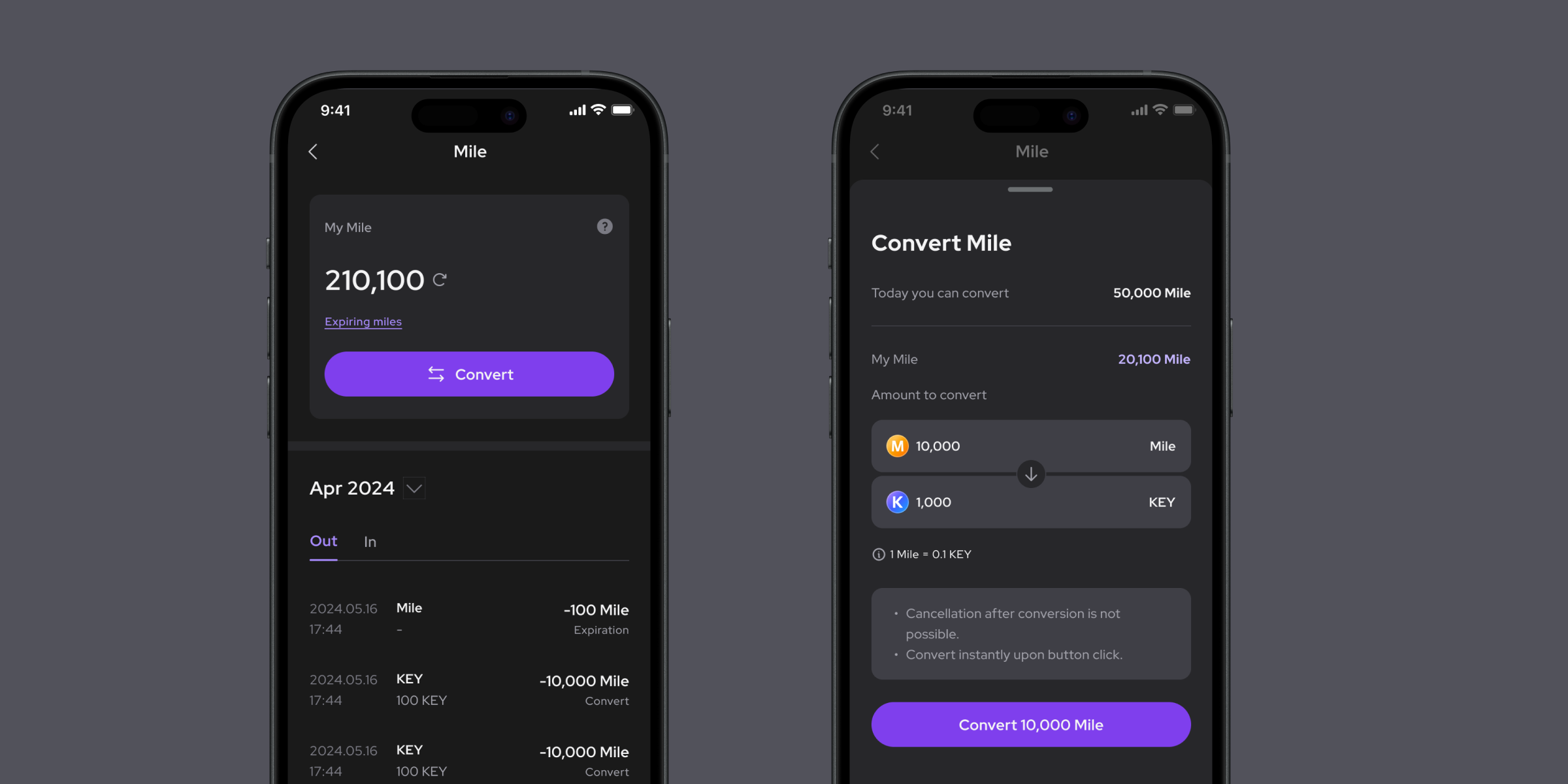
# Mile Management

Mile is a free point system used within Alt.town. All Mile usage history can be viewed here. You can check the detailed explanation on the page below.

<figure><img src="/files/z8etCD6KuLtSxWiPiAo8" alt=""><figcaption></figcaption></figure>


# Convert

Mile can only be converted to KEY in increments of 10,000 Mile to 1,000 KEY. The maximum amount that can be converted per day is limited to 50,000 Mile.

{% hint style="info" %}
Mile Conversion Rate : 1M=0.1KEY
{% endhint %}

**Mile Convert**

1. Click on ‘My Mile’ - ‘Convert’ under the ‘MY’ tab.
2. Review the Mile conversion details and click the 'Convert' button. Once Mile is converted to KEY, the transaction cannot be reversed.

<figure><img src="/files/L1HnIW8qW0Vm5ts2XQP4" alt=""><figcaption></figcaption></figure>

*🌟 The validity period for Mile is 1 year. Accumulated points will expire on the 15th of the corresponding month the following year. e.g. Mile accumulated in May 2023 will expire on May 15, 2024.*


# Reward Tab

Users can earn Mile through Charge Station events. Earned Mile can be converted to KEY. Collect more Mile and enjoy various services in Alt.town!

## **Attendance Check**

Check-in daily! Earn 200 Mile for achieving a 5-day consecutive check-in streak. The streak resets if you fail to maintain consecutive attendance. The Round indicates the number of times a user has achieved 5 consecutive days of attendance, and you can track the progress status through badges.

<figure><img src="/files/STWmz4j3IyCLTCZLMm1R" alt=""><figcaption></figcaption></figure>

*🌟 The attendance check event will continue until further notice.*

***

## **Friend Invitation**

This is Alt.town's referral event. You can earn unlimited Miles by inviting friends. Simply enter the referral code shared by your friend. After registration, when the invited user purchases 10 or more DNA of any Alt, both the inviter and the invitee will receive 500 Miles each. Invite friends now and check your ranking! The more friends you invite, the more your Alt grows.

<figure><img src="/files/RZ5ebtW5bj4TKmEuGgCp" alt=""><figcaption></figcaption></figure>

*🌟 The friend invitation event will continue until further notice.*

***

## **DNA Trade Event**

You can earn Miles based on your trading volume! The rewards increase as your trading volume level grows. Levels range from 1 to 15.

<figure><img src="/files/uTUk5Em1uURBcEIOnilW" alt=""><figcaption></figcaption></figure>

***

## **Wallet Registration**

Wallet creation is automatically completed with the email address entered during login and is only required once during the initial setup. Upon creation, you'll immediately receive a random DNA from Alt as a welcome gift.

<figure><img src="/files/2P5ygMEVDevL6k5MdNWs" alt=""><figcaption></figcaption></figure>


# User Guide

Details will be released at the time of service launch.


# Frequently Asked Questions

<details>

<summary><strong>What is Alt?</strong></summary>

Alt refers to virtual celebrities such as VTubers, virtual streamers, virtual idols, and virtual humans, who are active in their respective countries and have recognition and value. Virtual celebrities registered in Alt.town issue digital assets called DNA and sell their value. Users can trade DNA, which represents a virtual celebrity's value.

</details>

<details>

<summary><strong>Can real money be used in Alt.town?</strong></summary>

Alt.town uses a KEY. You can convert free points called Mile and the governance coin called $TOWN into KEY. While Mile and KEY can only be used within Alt.town, $TOWN can be exchanged for other cryptocurrencies or fiat currency on cryptocurrency exchanges.

</details>

<details>

<summary><strong>Can anyone sell their value?</strong></summary>

In the beginning of the service, only those affiliated with the Alt.town team and registered virtual celebrities in Alt.town will be able to do so. After a certain period, anyone who registers as an Alt will be able to sell their value.

</details>

<details>

<summary><strong>How can I register as an Alt in Alt.town?</strong></summary>

To register as an Alt in Alt.town, you must be an active virtual celebrity (VTuber, virtual influencer, etc.) who is currently streaming on any platform. Registration details can be found through the provided link. The link to sign up for Alt registration will be announced separately.

</details>

<details>

<summary><strong>What does it mean to trade value?</strong></summary>

It means converting and trading the value of a virtual celebrity—including their followers and fans, as well as their talents, potential, and capabilities—into a digital asset. Similar to buying stocks of a company, by purchasing the DNA of a virtual celebrity, you are sharing in their growth value.

</details>

<details>

<summary><strong>How can Alts earn revenue in Alt.town?</strong></summary>

As an Alt, you possess pieces of your DNA that symbolize your value. You can expect to see your value grow based on market evaluation. You will also earn revenue from commissions generated by the amount of DNA traded. Depending on the additional features Alt.town adds to the service in the future, you can also earn additional revenue through subscription models or merchandise sales.

</details>

<details>

<summary><strong>How can users earn revenue in Alt.town?</strong></summary>

Users can trade DNA on Alt.town. Trading DNA can be profitable, but it also carries risks and can result in losses. Alt.town does not guarantee any profits or losses from DNA trading. Therefore, please be cautious when making trades. In addition to profits, Alt.town will provide a variety of activities for users to engage in and enjoy, which will support and contribute to the growth of the DNA price of your favorite Alt.

</details>

<details>

<summary><strong>What benefits do Alts get from Alt.town?</strong></summary>

Alts can benefit from increased exposure to a wider audience. Alt.town is a global service that transcends borders, so if you're currently streaming in any country and you're registered on Alt.town, you can make yourself known to a global audience. Alt.town also provides the opportunity to connect and interact with more fans through various events and additional features within the service.

</details>

<details>

<summary><strong>What benefits do users get from Alt.town?</strong></summary>

Users can participate in the growth in value of their favorite virtual celebrities. Also, user can meet and engage with many global Alts who are actively streaming.

</details>

<details>

<summary><strong>Are there similar services to Alt.town?</strong></summary>

The concept of trading in the value of virtual celebrities is a world first. There are similar services for fractional investments in music copyrights, real estate, etc. Other services include Friend.tech, which involves investing in celebrity value, and Trendex, a service that trades personal value for famous soccer players and celebrities.

</details>

<details>

<summary><strong>What does DNA mean?</strong></summary>

DNA (Dynamic Nurture of Affection) refers to all the processes involving continuous interest and contribution to the growth and development of Alt. In Alt.town, we use it as a term to express the values of the Alt.

</details>

<details>

<summary><strong>Why does it take 12 hours to process a withdrawal?</strong></summary>

This policy is in place to ensure withdrawal stability during the initial phase of the Alt.town service. We plan to gradually reduce the withdrawal time in the future.

</details>


# Wallet

Users can store and conveniently manage various currencies used in Alt.town in the wallet. The wallet is a WEPIN wallet, and the currencies stored in it include DNA, KEY, and $TOWN. Mile is not recorded on-chain.

## **WEPIN Wallet**

The WEPIN wallet is a private space where external transactions are possible and stores $TOWN, the governance token of Alt.town. The wallet is created only once during sign-up by matching the user’s email. Wallet-related matters such as creation, loss, and recovery are subject to WEPIN policies.&#x20;

For detailed information and inquiries, please refer to the link below.

{% embed url="<https://www.wepin.io/>" %}


# Get Started

Alt.town is built as a progressive web app (PWA).

Instead of installing a separate app from the app store, you can access it through a web browser and download it to your smartphone like an app.

## **Getting started in Safari on iOS (iPhone)**

1. Access the Alt.town site using your Safari browser.
2. Click the Share button at the bottom center of the Safari browser.
3. Select the ‘Add to Home Screen’ menu.

<figure><img src="/files/kUzMgsNupbNzTH3t9CSg" alt=""><figcaption></figcaption></figure>

***

## **Getting started in Chrome (Android)**

1. Access the Alt.town site using your Chrome browser.
2. Click the menu at the top right corner of the Chrome browser.
3. Select the ‘Add to Home Screen’ menu.

*🌟 For Android smartphones, we recommend using the Chrome browser. If you are using the Samsung Internet browser and experience login issues, restart the PWA and try again.*

<figure><img src="/files/WrkFJeKmEYQZ12eomVb9" alt=""><figcaption></figcaption></figure>

<figure><img src="/files/O8eFEHuDLThaKAphJQ2z" alt=""><figcaption></figcaption></figure>


# Swap

Until the service is stabilized, BNB will be used instead of $TOWN.

## **Spending**

Spending is a space for storing KEY used within Alt.town. KEY can be swapped for $TOWN and transferred to your wallet.

* **Sending KEY → $TOWN**

1. Click ‘Swap’ for KEY under the ‘MY’ - ‘Spending’ tab.

<figure><img src="/files/THMWWcLjB64y1zw9EMdN" alt=""><figcaption></figcaption></figure>

2. Enter the amount of KEY you wish to swap for $TOWN from your available KEY balance, then click the 'Swap' button. Review the precautions and click the 'Confirm' button.

<figure><img src="/files/bsuepWsLWpuu4tVxEyaH" alt=""><figcaption></figcaption></figure>

*📍 The minimum amount for KEY → $TOWN swap is 500 KEY, and the maximum amount per swap is 5,000,000 KEY. The maximum swap limit per day is 20,000,000 KEY.*

3. Enter your login password (minimum 8 characters) to complete the transfer. You can check the transfer processing status under the 'Wallet' tab - 'History', and the transfer processing result under the 'Spending' tab - 'Key Detail'.

<figure><img src="/files/Moyl7JuUMvPhBuSJtYzy" alt=""><figcaption></figcaption></figure>

*📍 It takes approximately 12 hours from withdrawal request confirmation to approval. This is necessary to ensure the security of the network and users.*

{% hint style="info" %}
There are four swap states:

* Queued - Waiting for approval for 12 hours after request confirmation.
* Status after withdrawal approval
  * Completed - On-chain processing completed
  * Failed - On-chain processing failed
  * Pending - On-chain processing delayed
    {% endhint %}

*🌟 The fee charged at this transaction is the expected gas fee.*

***

## **Wallet**

Wallet is a personal space for external transactions and stores $TOWN, Alt.town's governance token. Currently, Alt.town is integrated with the Wepin wallet.

* **Sending $TOWN → KEY**

1. Click ‘Swap’ for $TOWN under the ‘MY’ - ‘Wallet’ tab.

<figure><img src="/files/7YB3ntTmQ3JyArGELbm2" alt=""><figcaption></figcaption></figure>

2. Enter the amount of $TOWN you wish to swap for KEY from your available $TOWN balance, then click the 'Swap' button.

<figure><img src="/files/S6XzcyVg9dFAmltYWcBM" alt=""><figcaption></figcaption></figure>

*📍 There is no limit on the amount for $TOWN → KEY swaps.*

3. Review the transaction details in your Wepin wallet and click the 'Agree' button and enter your 6-digit Wepin wallet PIN to complete the swap. You can check the transfer processing status under the 'Wallet' tab - 'History', and the transfer processing result under the 'Spending' tab - 'Key Detail'.

<figure><img src="/files/7SA6LOPwMg6w8IGJNIwS" alt=""><figcaption></figcaption></figure>

*🌟 No fees are charged for this transaction.*


# Sign-up and Sign-in

## 1. **Enter your email**

Enter the email address you would like to sign up with. You can log in by entering your email address on the login page.

<figure><img src="/files/OiXJOrIlgg6xVhQuDfBF" alt=""><figcaption></figcaption></figure>

*🌟 To use Alt.town services, you must agree to the **Privacy Policy** and **Terms of Use/Service.** By creating an account, you are considered to have agreed to all of them. If you do not wish to agree, you will be unable to access the services.*

## 2. **Email Verification**

Verify your email address using the code sent to the email you entered.

<figure><img src="/files/R7RHQ5fV3kWRhqtiIa6Q" alt=""><figcaption></figcaption></figure>

## 3. **Set a password**

Set a password that meets the requirements. Your password will be used for activities such as login, currency exchange, etc. Please be careful not to disclose your password.

<figure><img src="/files/nQfkvw25TgpFdlksu7oj" alt=""><figcaption></figcaption></figure>

*🌟 You can reset your password in MY - Settings - Account - Account Settings.*

## 4. **Set your username**

Your username represents you in Alt.town. It can be any combination of letters, numbers, and symbols (-\_) from 4 to 20 characters.

<figure><img src="/files/vpMDBQYI4JRnMA7Tpeli" alt=""><figcaption></figcaption></figure>

*🌟 You can change your username up to 2 times in 14 days. You can reset your username in MY - Settings - Account - Profile. Usernames that impersonate administrators or contain offensive language are not allowed. Please set an appropriate username in accordance with these guidelines.*

## 5. **Enter your referral code**

This is the referral code entry screen connected to the friend invitation event for Mile charging. Simply enter the referral code shared by your friend. After signing-up, when the invited user purchases 10 or more DNA of any Alt, both the inviting user and the invited user will receive 500 Mile each.

<figure><img src="/files/AS1H8K5pCv5E8DTzjhe4" alt=""><figcaption></figcaption></figure>

*🌟 Referral code entry can be skipped. The referral code entry screen is displayed only once during the initial sign-up, and it cannot be changed or entered afterward.*

## 6. **Sign-up Complete**

All sign-up steps are complete, congratulations! Now you can start trading the value of your virtual celebrity on Alt.town.

<figure><img src="/files/pHkGny2inJof37rW1bfU" alt=""><figcaption></figcaption></figure>


# Help Desk

## Sign in or sign up to Alt.town

<details>

<summary><strong>I don't know how to access my account.</strong></summary>

If you don't know what email address you created your account with, check your email inbox. You should have received a verfication email from Alt.town when you created your account for the first time.

</details>

<details>

<summary><strong>I'm not receiving verification emails from Alt.town.</strong></summary>

Step 1: Make sure your email address is correct.&#x20;

Step 2: Check your spam, trash folders, and other email filters.

Step 3: Allow receiving emails from Alt.town.

If you still have problems with receiving emails, please contact <contact@alt.town> for further assistance.

</details>

<details>

<summary><strong>I cannot sign in with wallet.</strong></summary>

First, have you registered with your email? You’ll need to sign up before you can connect a wallet. \
\
Second, make sure the wallet you're trying to sign in with is the same one you initially connected. \
\
Once linked, a wallet address is permanently tied to your account and cannot be changed.

</details>

<details>

<summary><strong>Can I change my password?</strong></summary>

1. In the app, tap MY on the bottom bar.
2. Tap Settings icon in the top-right corner.
3. Tap Account.
4. Tap Change password.

</details>

<details>

<summary><strong>Can I change my email address?</strong></summary>

Alt.town does not support email address change.

</details>

<details>

<summary><strong>Can I change my wallet address?</strong></summary>

Wallet addresses cannot be changed on Alt.town.&#x20;

If you'd like to use a different wallet, please create a new account.

</details>

***

## Account settings in Alt.town

<details>

<summary><strong>I cannot connect to my wallet for some unknown reason.</strong></summary>

The wallet provider may be temporarily unavailable due to unforeseen circumstances.\
Please try again later using a different device.\
\
If the issue persists, contact your wallet provider directly for further assistance.

</details>

<details>

<summary><strong>Can I change my username?</strong></summary>

You can change your username within 14 days.

1. In the app, tap MY on the bottom bar.
2. Tap the Settings icon in the top-right corner.
3. Tap Account.
4. Tap Profile.

</details>

<details>

<summary><strong>I do not receive any rewards for various registration events.</strong></summary>

We provide rewards after verifying that the information you submitted for various events matches the details used to access the Alt.town app. Please double-check your email and wallet address.\
\
If you’re still experiencing issues with receiving rewards, contact us at <contact@alt.town> for further assistance.

</details>

Learn more about Alt.town, please visit our website and social media.

{% embed url="<https://alt.town>" %}